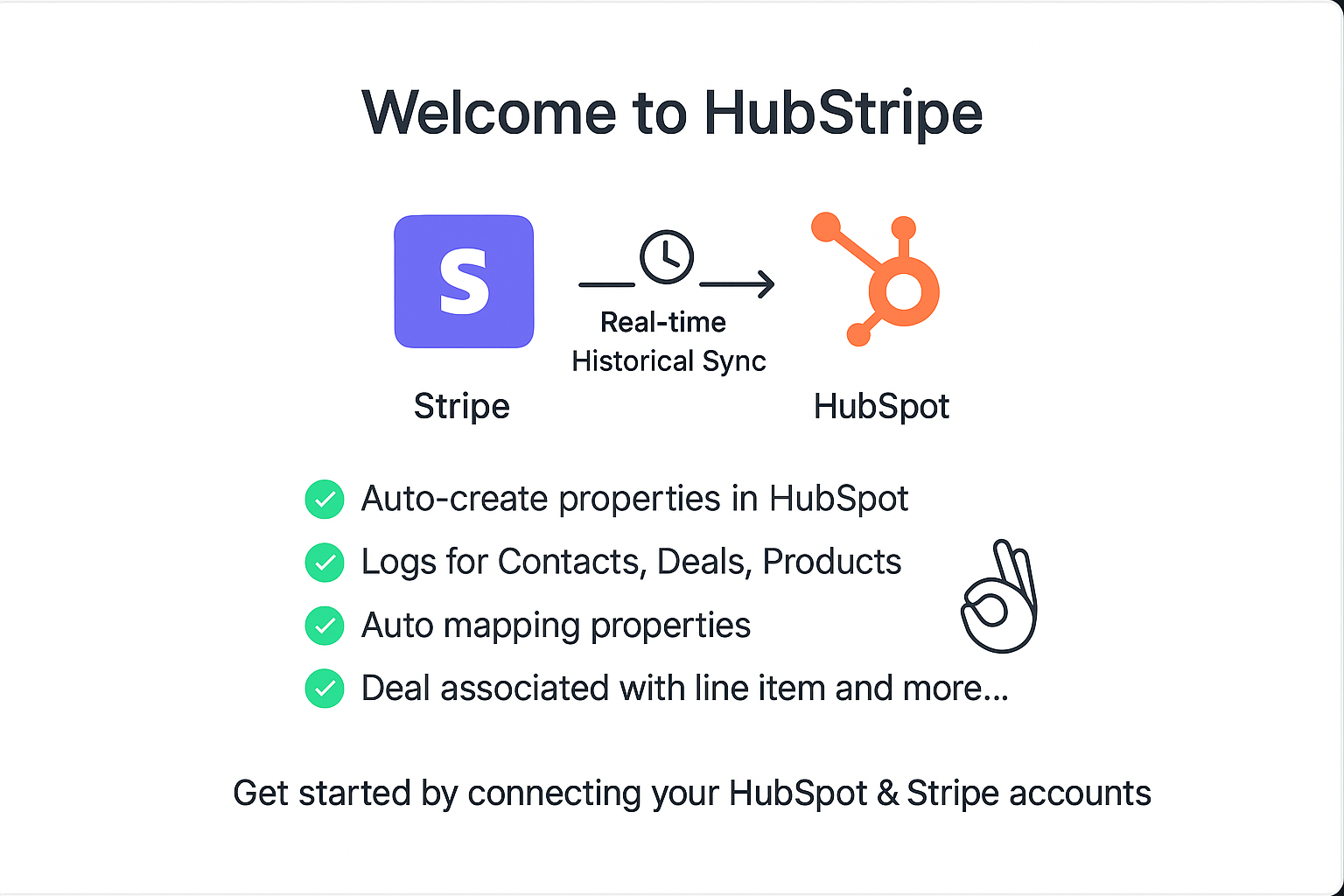
Getting Started
HubStripe is a HubSpot public app that keeps Stripe and HubSpot aligned. After installing from the HubSpot Marketplace, you’ll be redirected to the HubStripe portal to finalize setup. The onboarding sequence is designed to be linear so that your connections and permissions are always valid before any sync is attempted.
- Register or log in to HubStripe portal account.
- Connect HubSpot so HubStripe can create and update Contacts, Deals, and Products.
- Connect Stripe so events and historical data can be read securely.
- Choose sync behavior - enable/disable real-time listeners per object and configure manual sync ranges.
- Review activity using the recent real-time log to confirm everything is flowing as expected.
Register / Login
Create your HubStripe account with either Google Sign-in or the standard email registration form. The same account is used across all your connected HubSpot portals and Stripe accounts.
- Google Auth – Fast, one-tap sign-in through your Google identity provider.
- Register form – Provide name, email, and password. A verification email may be sent based on your security settings.
After registration, return to the login screen and sign in to proceed to the connection steps.
Go to HubStripe and Register (login if account already created)
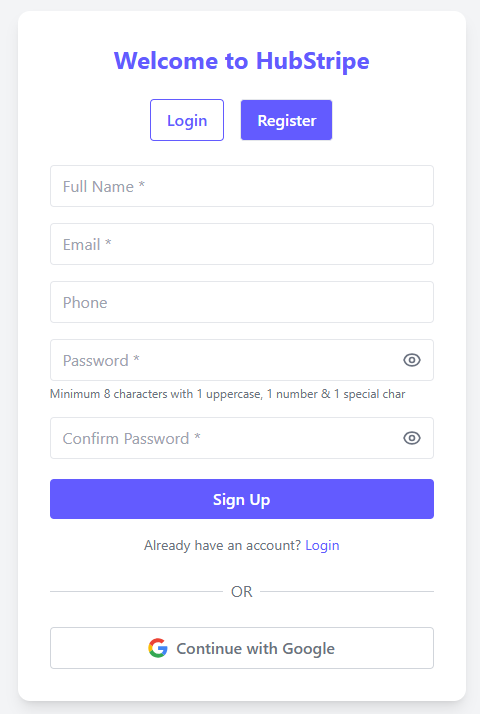
Or conitnue with Google Sign-Up
Go to HubStripe and login (regiser if account not created)
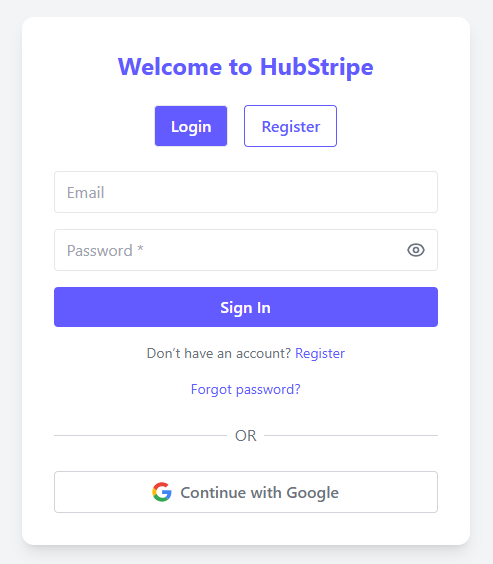
Or continue Google sign-in
Connect HubSpot & Stripe
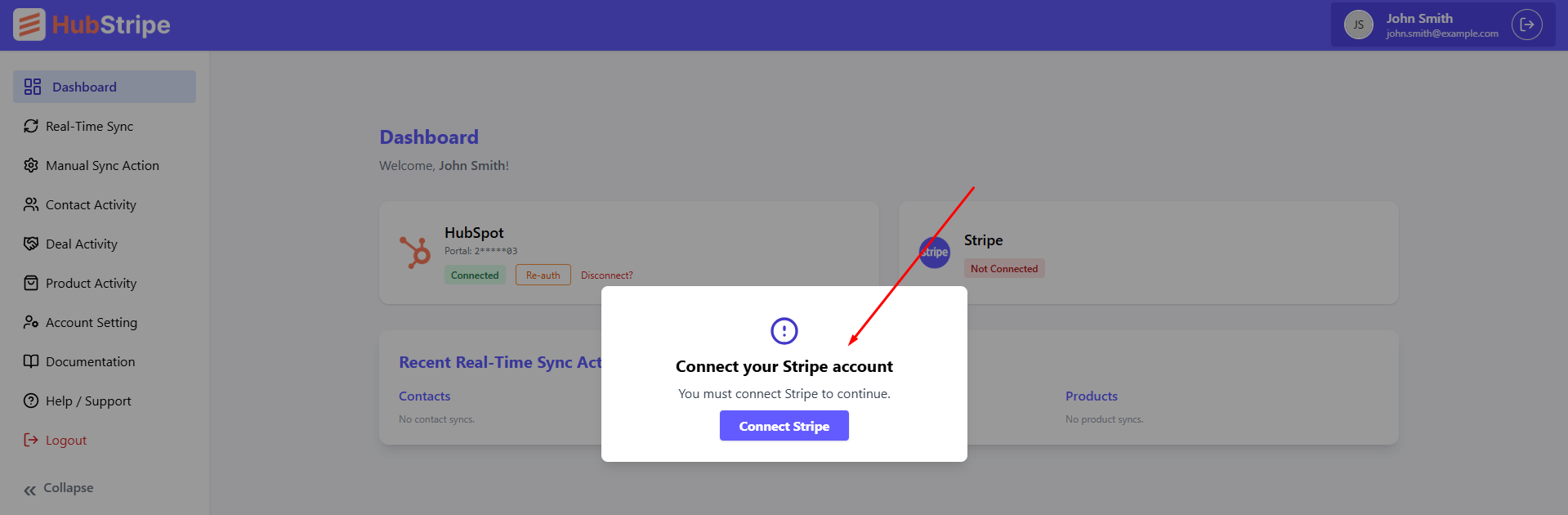
Connections are made in a specific order. First, authorize HubSpot so HubStripe can create and update objects in your portal. Next, authorize Stripe. Until Stripe is connected, a blocking popup will remain visible and you won’t be able to proceed to settings.
- HubSpot Authorization – Grants permission to create/update Contacts, Deals, and Products.
- Stripe Authorization – Securely links your Stripe account so HubStripe can receive webhooks and run manual imports.
Both connections can be revoked and re-connected at any time from the same screen.
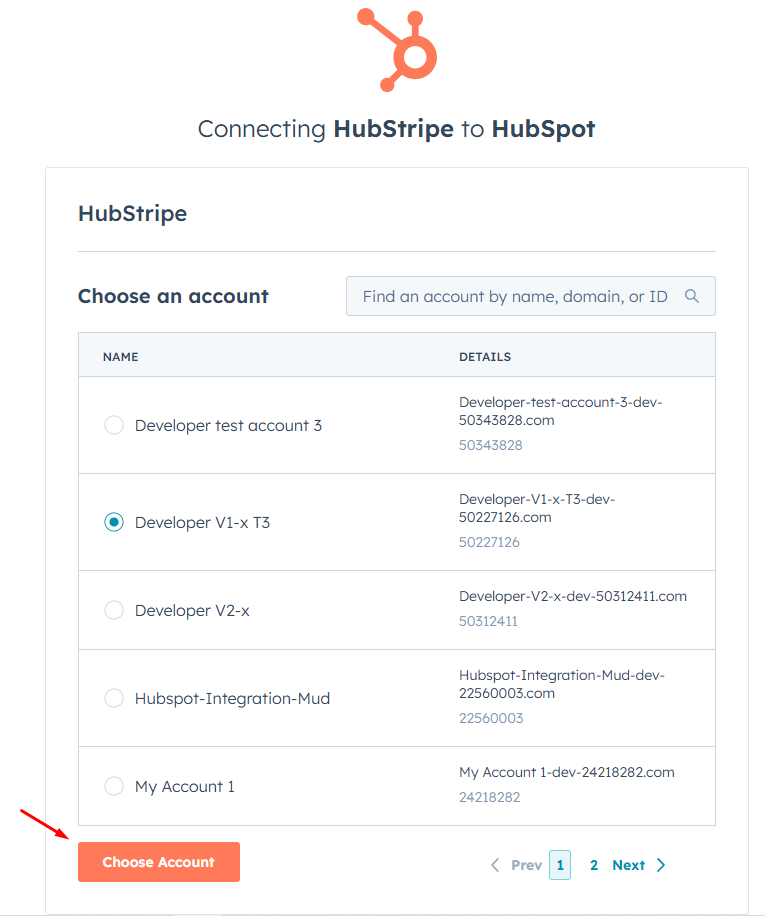
Click connect button for connecting HubSpot
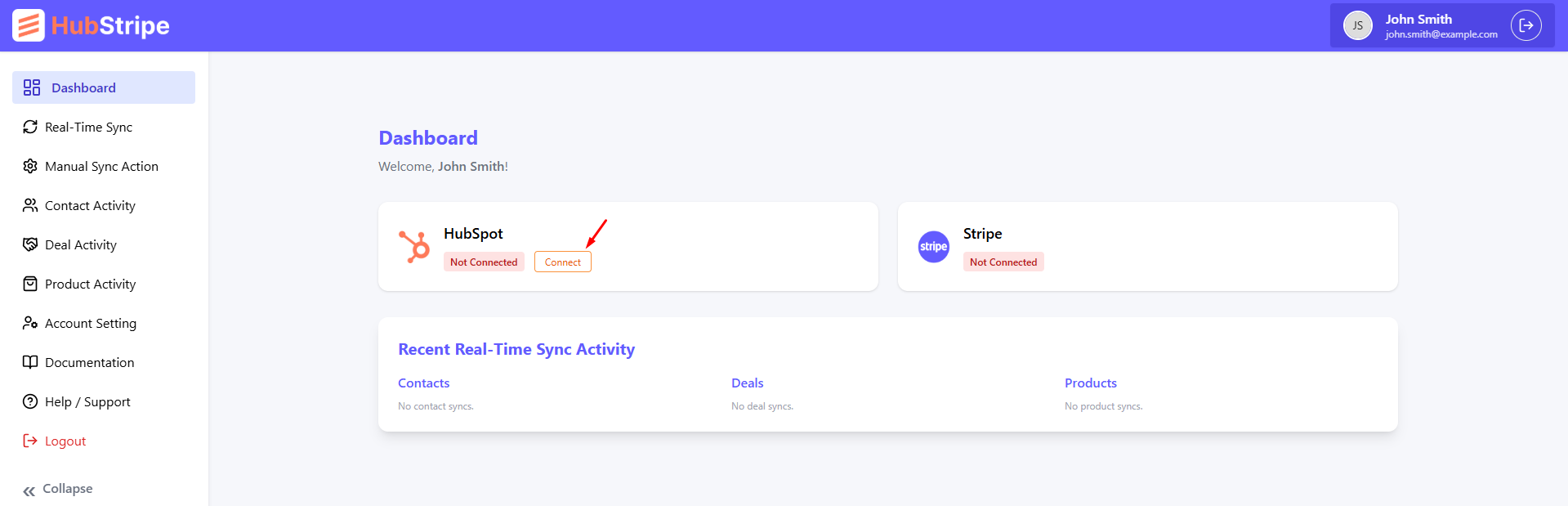
Choose HubSpot Account and continue
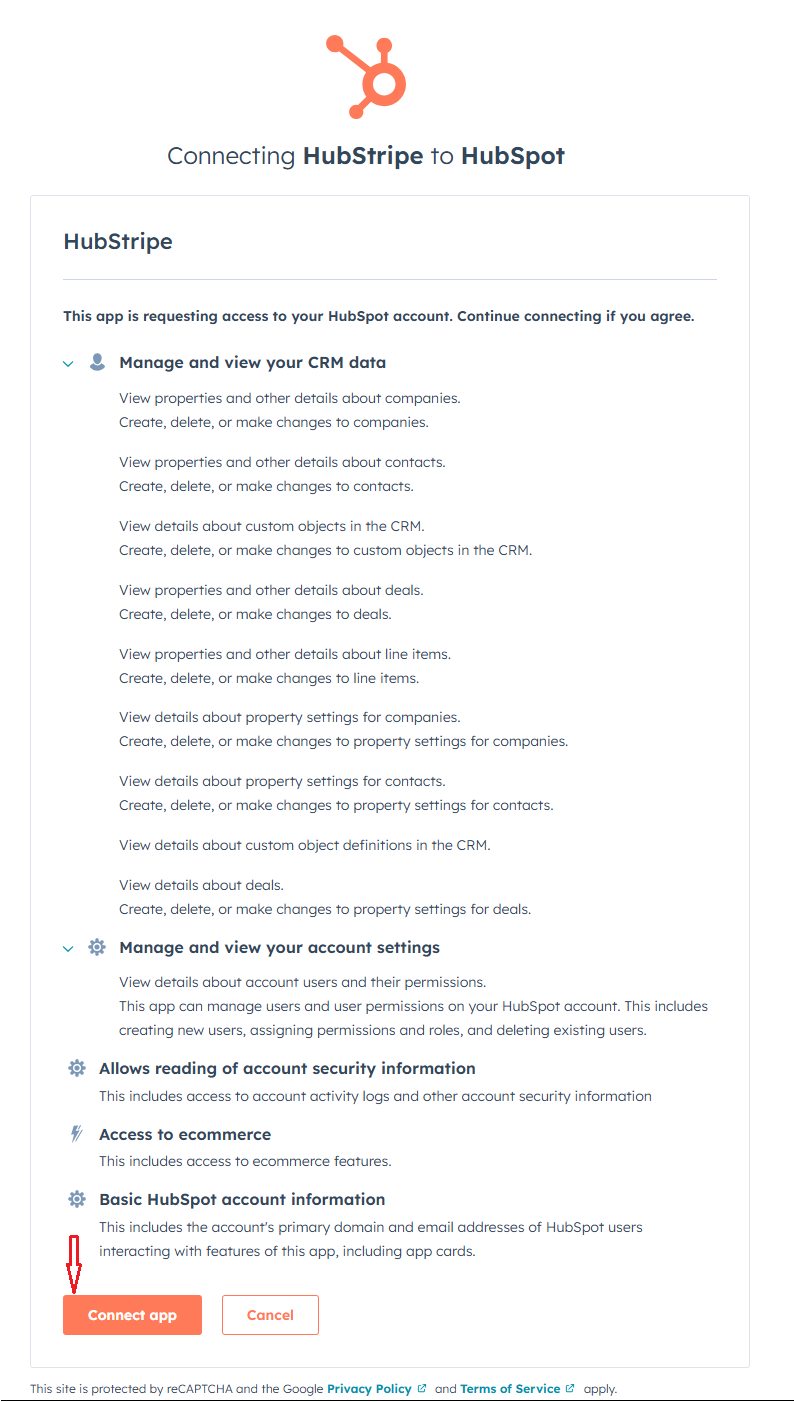
After selecting HubSpot account click connect app
Now connect Stripe account
After connecting HubSpot account connect Stripe account
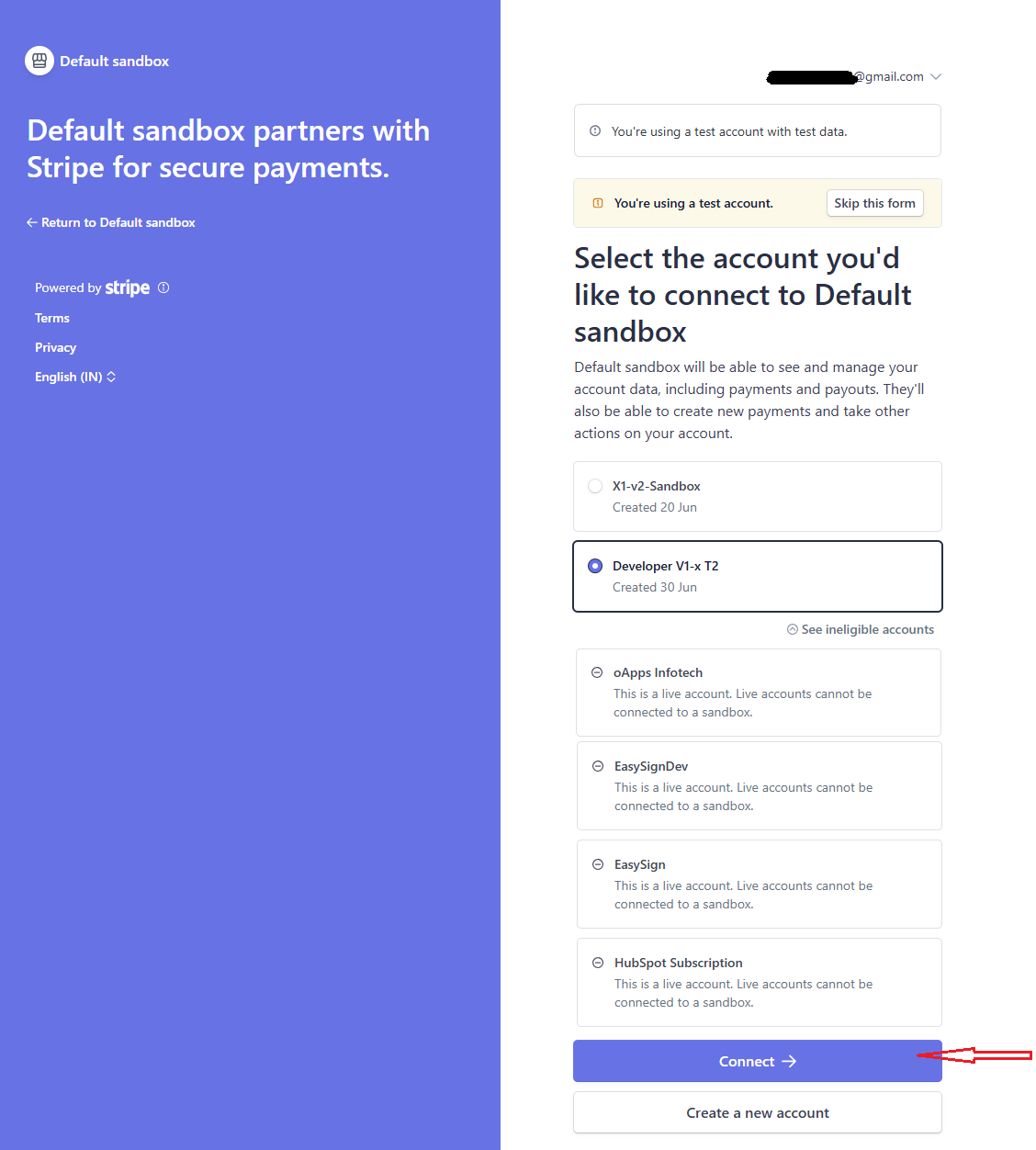
Select stripe account and click connect
Important Notice
HubStripe is not a payment processor. It does not handle payments, refunds, or disputes. It only syncs data between Stripe and HubSpot. For payment processing, use Stripe directly. HubStripe simply keeps your CRM updated with the latest customer, product, and order information.
HubStripe do not delete records from HubSpot or Stripe. Hubstripe just read the data from stripe and send it to HubSpot. We do not delete any data from stripe or HubSpot. And we do not update record to HubSpot if manual sync is done from HubStripe dashboard.
Real-time Sync Settings
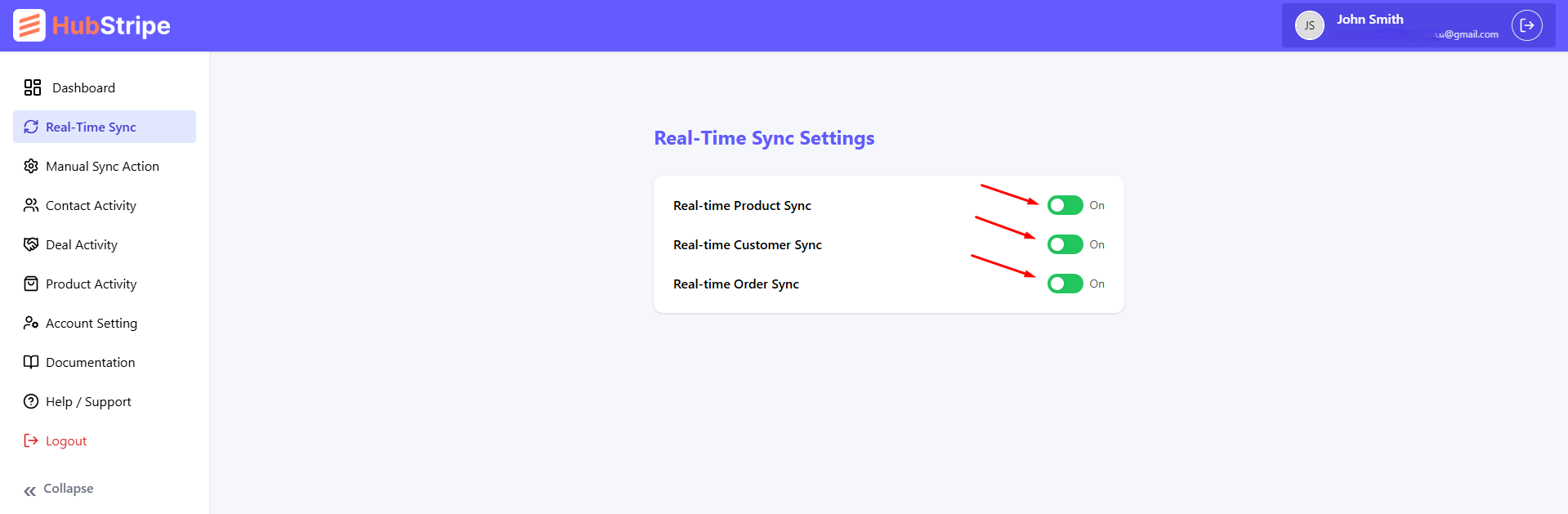
Real-time sync listens to Stripe events and mirrors them into HubSpot within seconds. You can enable or disable any object independently. When enabled, HubStripe will create the record if it doesn’t exist, or update the existing record using the Stripe source of truth.
- Contacts – Triggered by Stripe customer creation/update. Matches by Stripe Customer ID and email.
- Deals – Triggered by checkout completion or payment intent success. Updates stage and amount on status changes.
- Products – Triggered by product/price changes in Stripe. Keeps HubSpot product library aligned.
If a HubSpot record already exists, only mapped fields are overwritten; your other HubSpot fields remain unchanged.
Real-time sync settings, you can enable or disable any object
Manual Sync
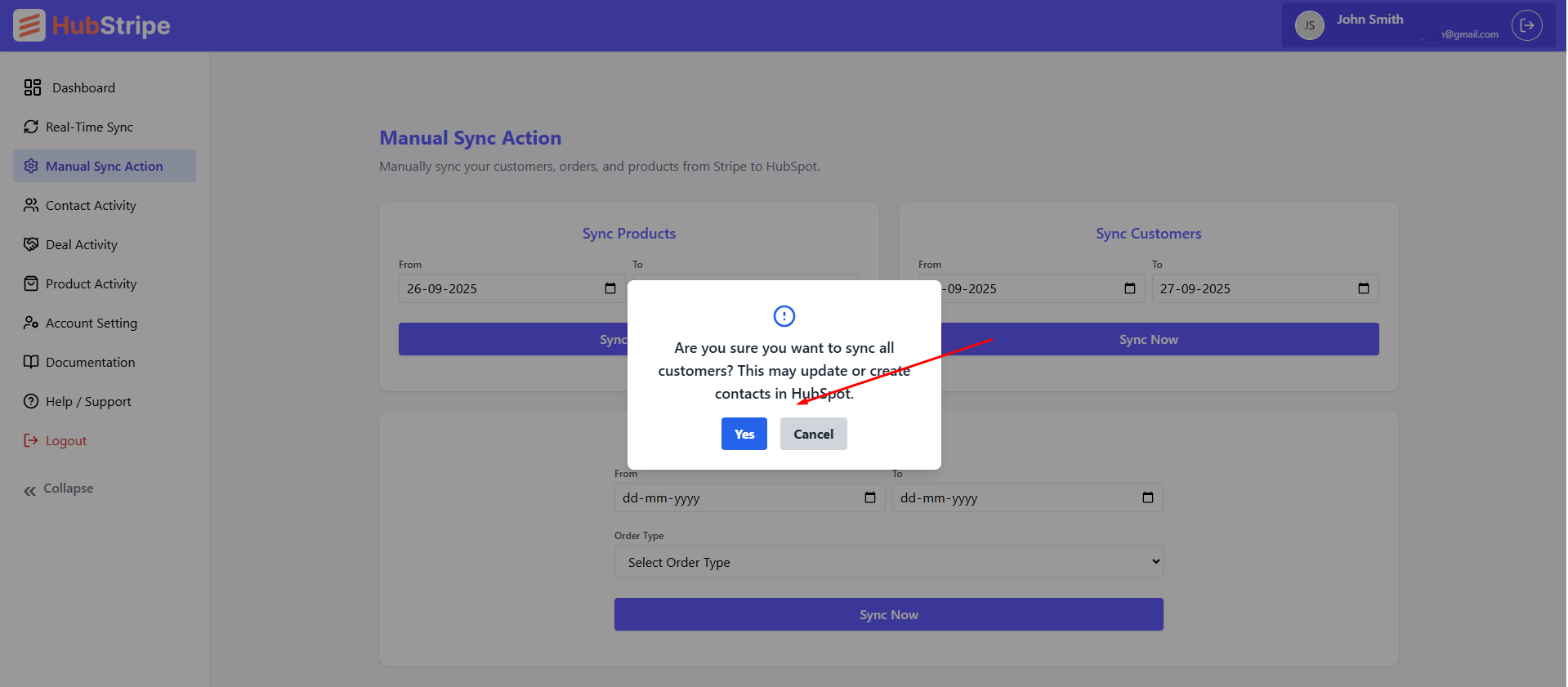
Use Manual Sync to backfill historical data or to re-run imports after making mapping changes. Select a From and To date, then click Sync Now. The job is queued and processed in the background; larger date ranges will naturally take longer.
Contacts
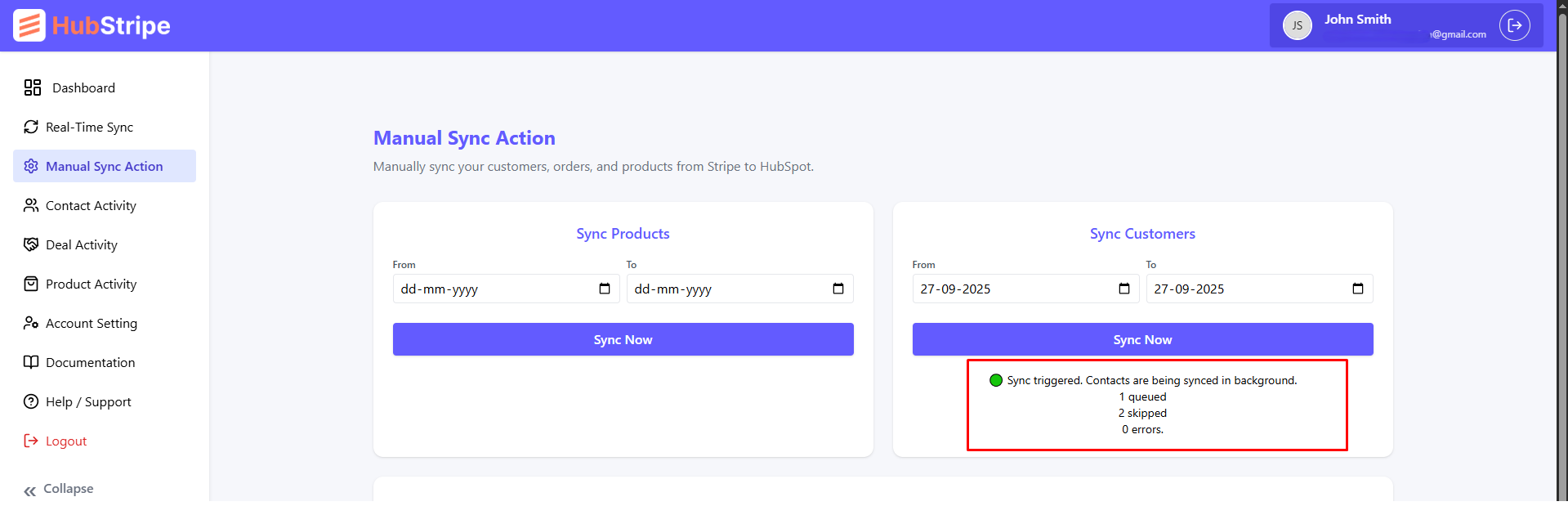
Imports Stripe customers created within the selected window. Existing HubSpot contacts are matched by Stripe Customer ID to prevent duplicates; otherwise a new contact is created with default HubSpot fields.
Manual contacts sync with date range and confirmation popup
Manual contact sync with information after click
Deals
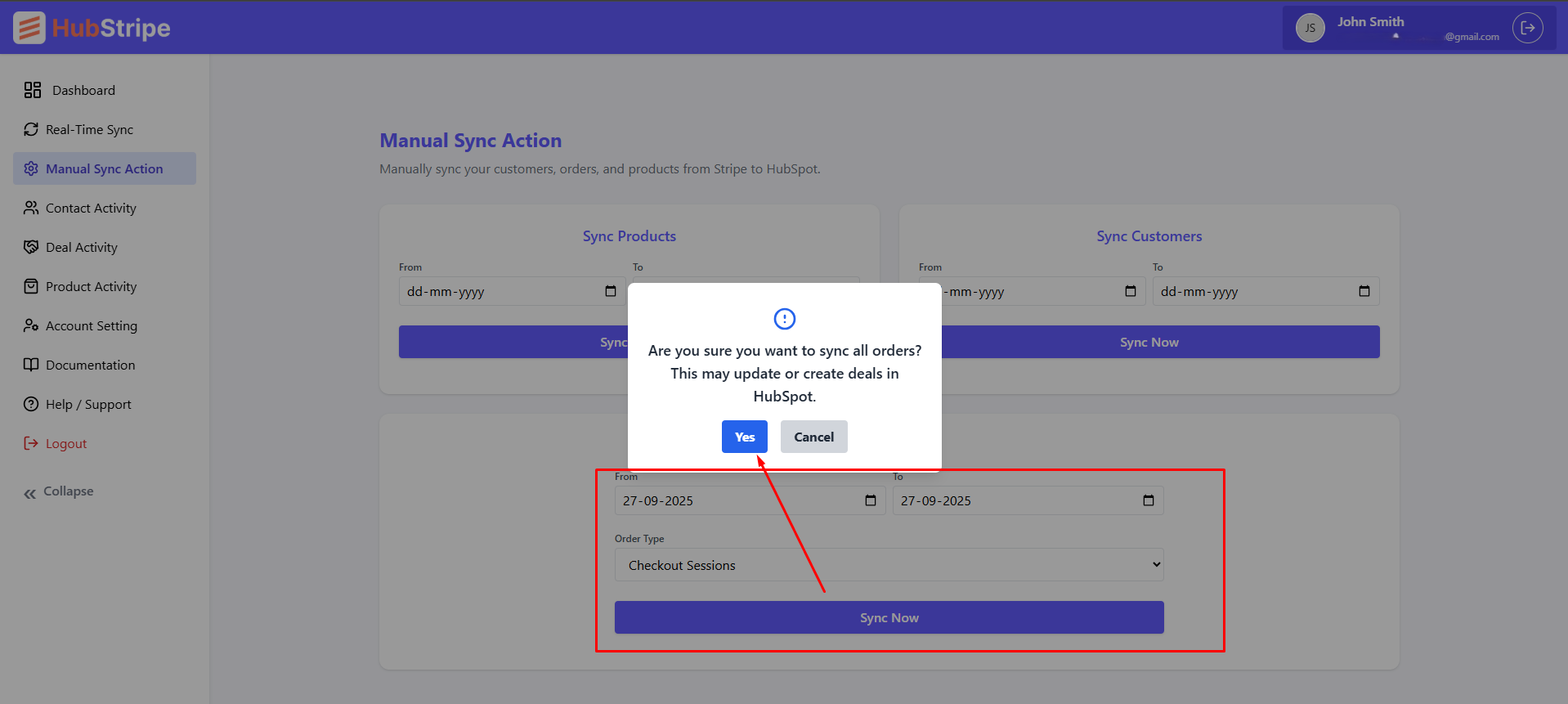
Order Type: Checkout Session or Payment Intent. Checkout Session covers most orders. If any orders were missed, switch to Payment Intent to recover them.
When a deal is created, HubStripe searches for matching products (by Stripe Product/Price IDs) and adds them as line items, associating everything to the deal automatically.
Manual deals sync with date range and confirmation popup
Products
Backfills products and prices from Stripe into HubSpot’s product library, including status, currency, lookup keys, and recurring metadata. Use this before running deal imports if your catalog was not previously synced.
Manual products sync with date range and confirmation popup and processing after click syn now
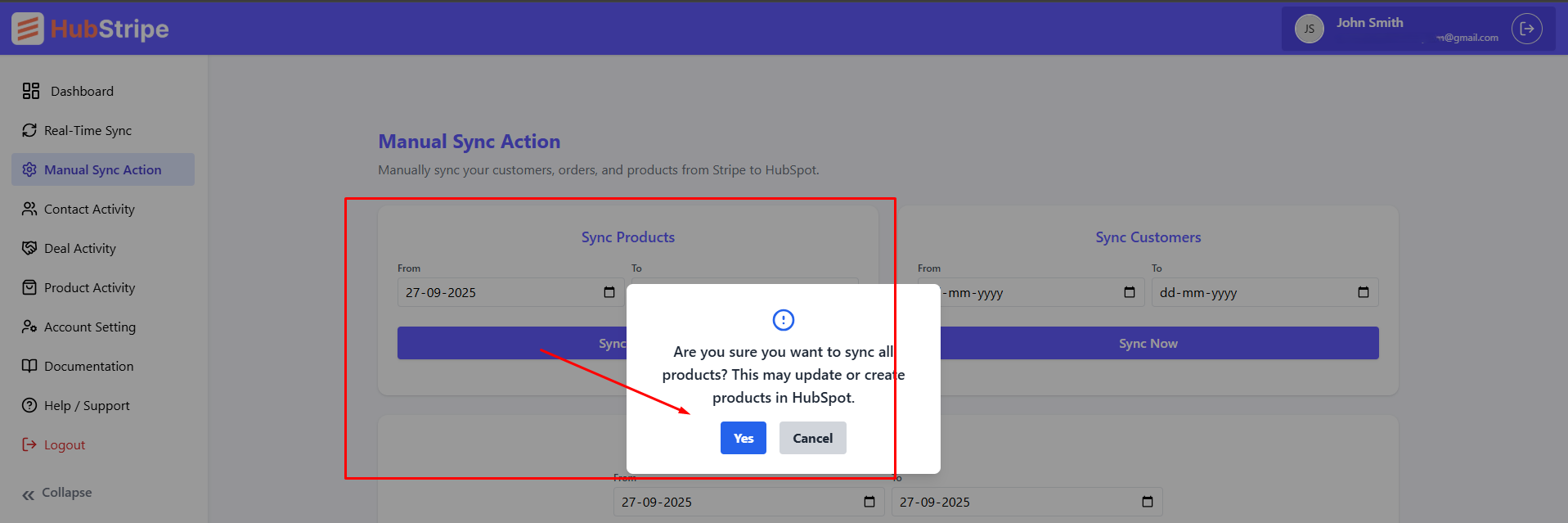
You can navigate away while a manual sync runs. Progress and errors (if any) appear in the activity log and in-app notifications.
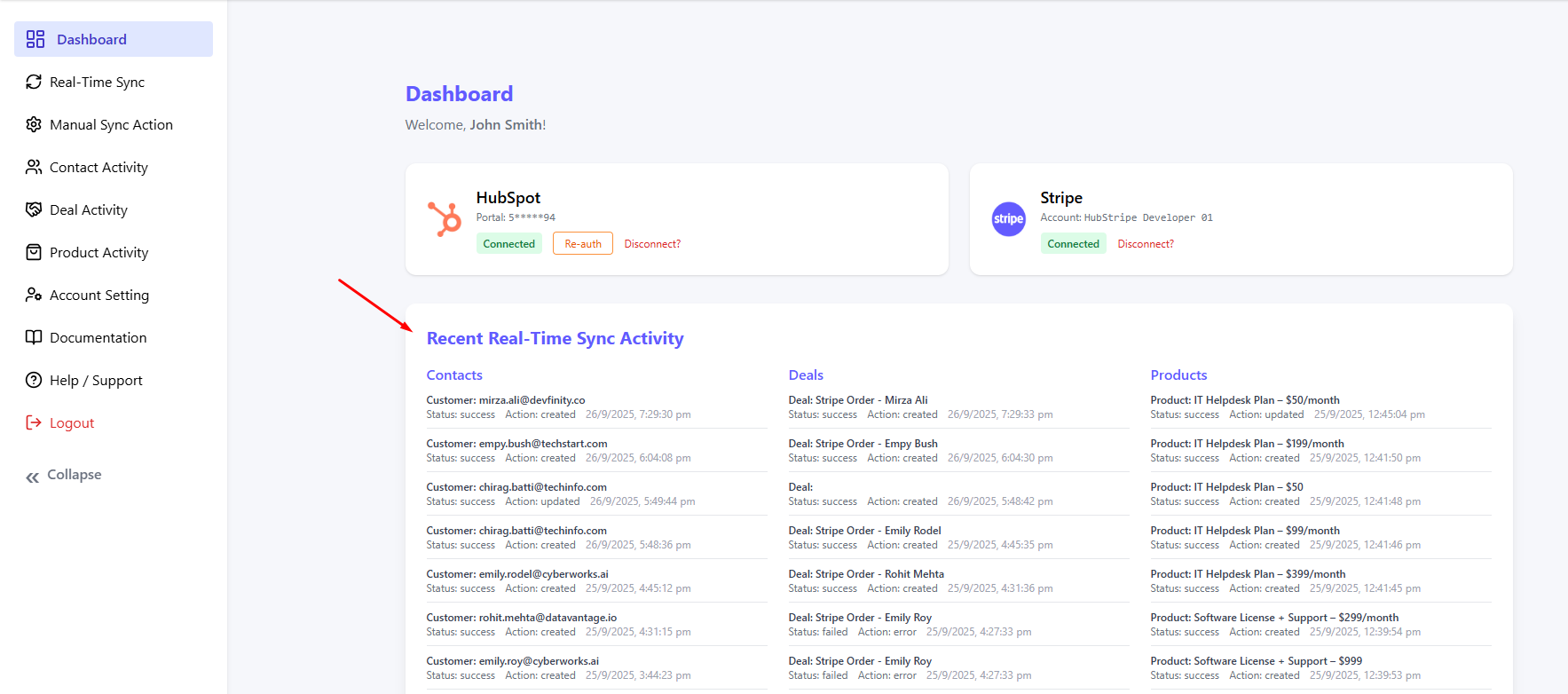
Recent Real-time Sync Activity
This table lists the most recent 5 webhook-driven actions per object so you can verify live behavior quickly. Each row shows when the event occurred, the Stripe source ID, the target HubSpot record ID, and whether the action was a create or update.
Recent activity log showing real-time sync events
Logs Activity
HubStripe provides detailed activity logs for each synced object for both real-time and manual sync. Logs make it easier to verify which records were created, updated, or skipped during sync and it show the error message if status failed or action error. This section covers Contact Logs, Deal Logs, and Product Logs.
Contact Logs
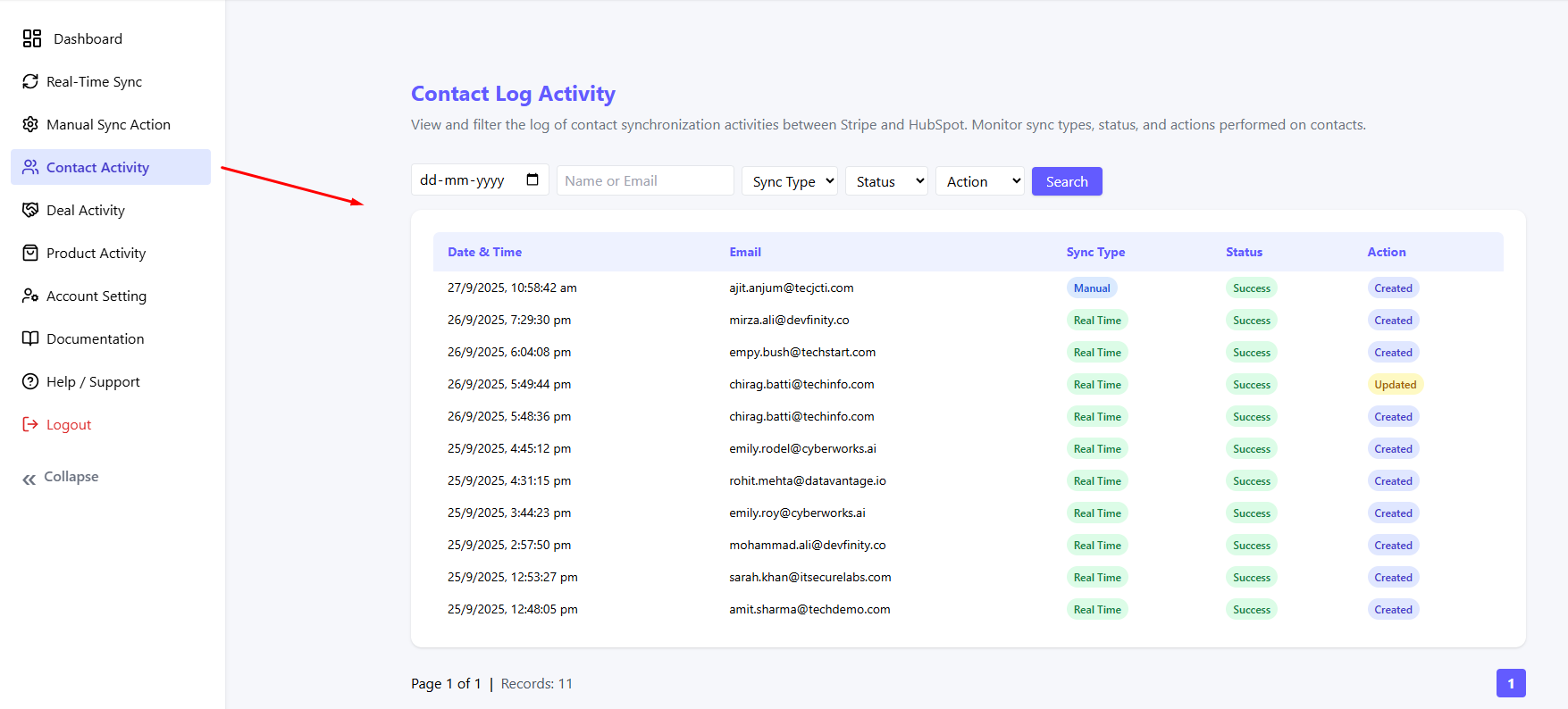
Contact logs show when a Stripe customer is created or updated in HubSpot. Each entry contains the Date & Time, Customer email, Action, Sync Type and Status and error messages if exist.
Contact log showing sync events status and action
Deal Logs
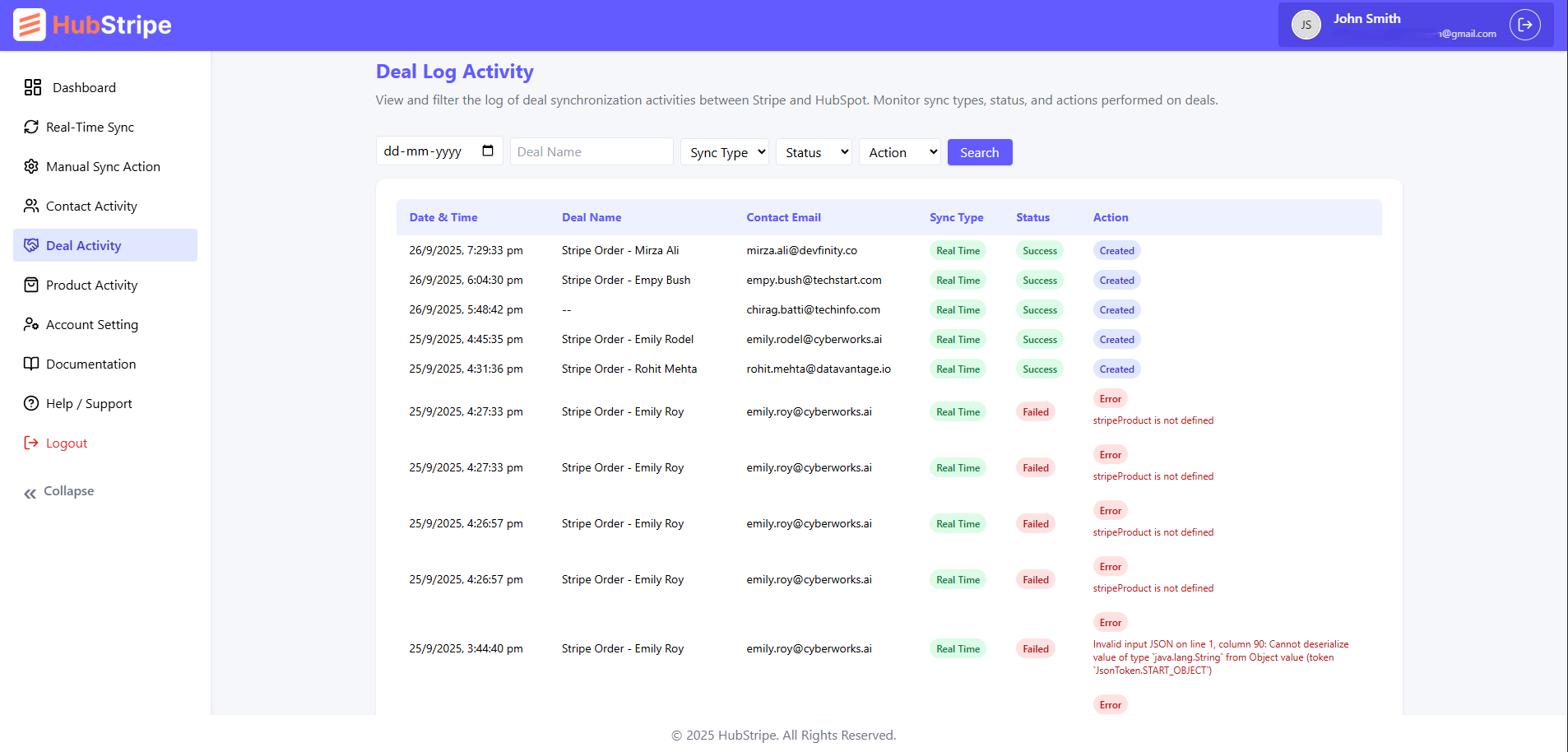
Deal logs record all invoice → deal sync operations. Details include the Date & Time, Deal name, Contact email, Action, Sync Type, Status and whether the deal was newly created or updated with error messages if status failed.
Deal log showing sync events status and more
Product Logs
Product logs show how Stripe products and prices are synced into HubSpot Products (with line items attached to deals). Each log entry indicates the Date & Time, Product name, Action, Sync Type, Status and sync outcome.
Product log showing events action and status
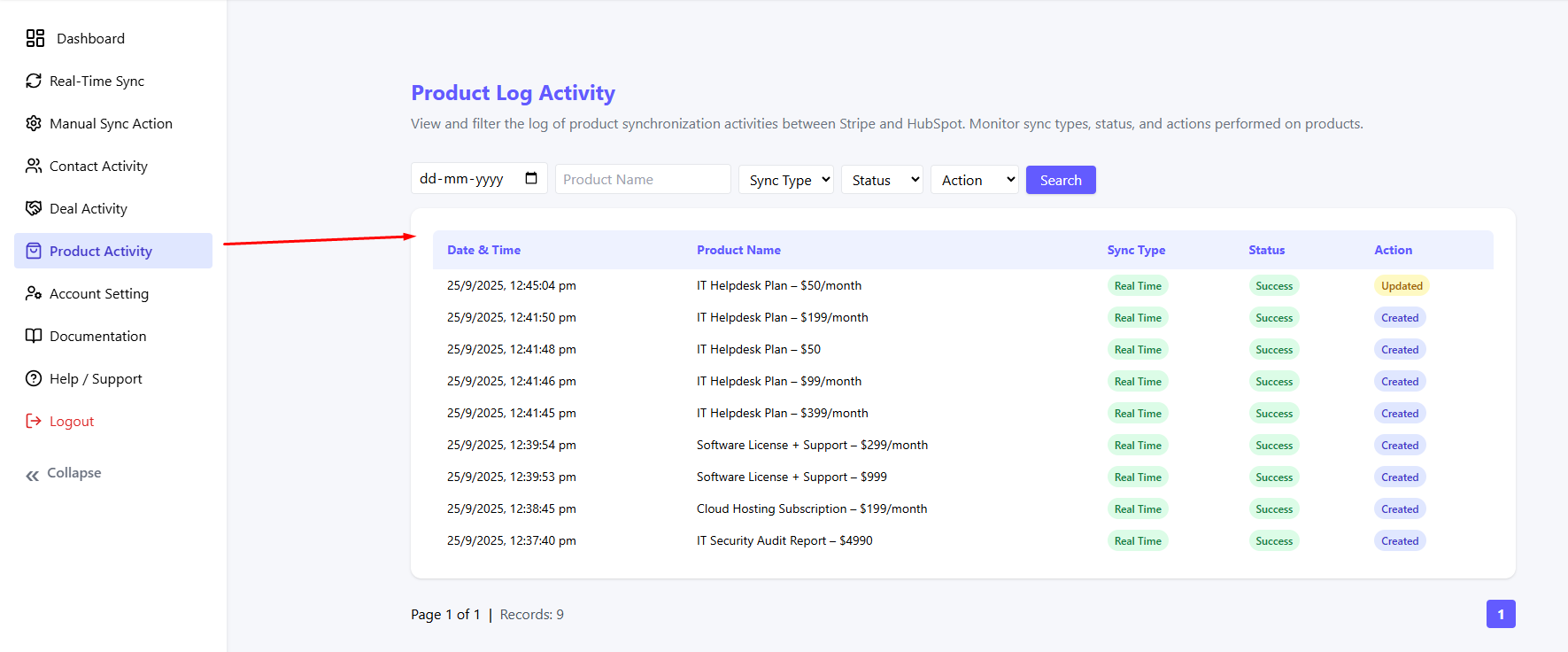
Tip: Use logs as the first place to troubleshoot any missing or failed records. Errors (if any) are highlighted with clear messages for quick resolution.
Plans
HubStripe offers three subscription plans that define the level of features and data sync capabilities between Stripe and HubSpot. Each plan includes all basic functionalities with incremental upgrades at higher tiers.
- HubStripe Basic – $19/month: Includes essential real-time and manual sync for Contacts and Deals.
- HubStripe Standard – $59/month: Adds extended sync for Products and advanced customization options.
- HubStripe Premium – $99/month: Includes everything in Standard plus priority sync and premium support.
Once a user subscribes to a plan, it appears as the Currently Active Plan. If a cancellation is scheduled, the user will see:
Cancellation scheduled. Ends on 10/11/2025
Subscription canceled on 10/10/2025
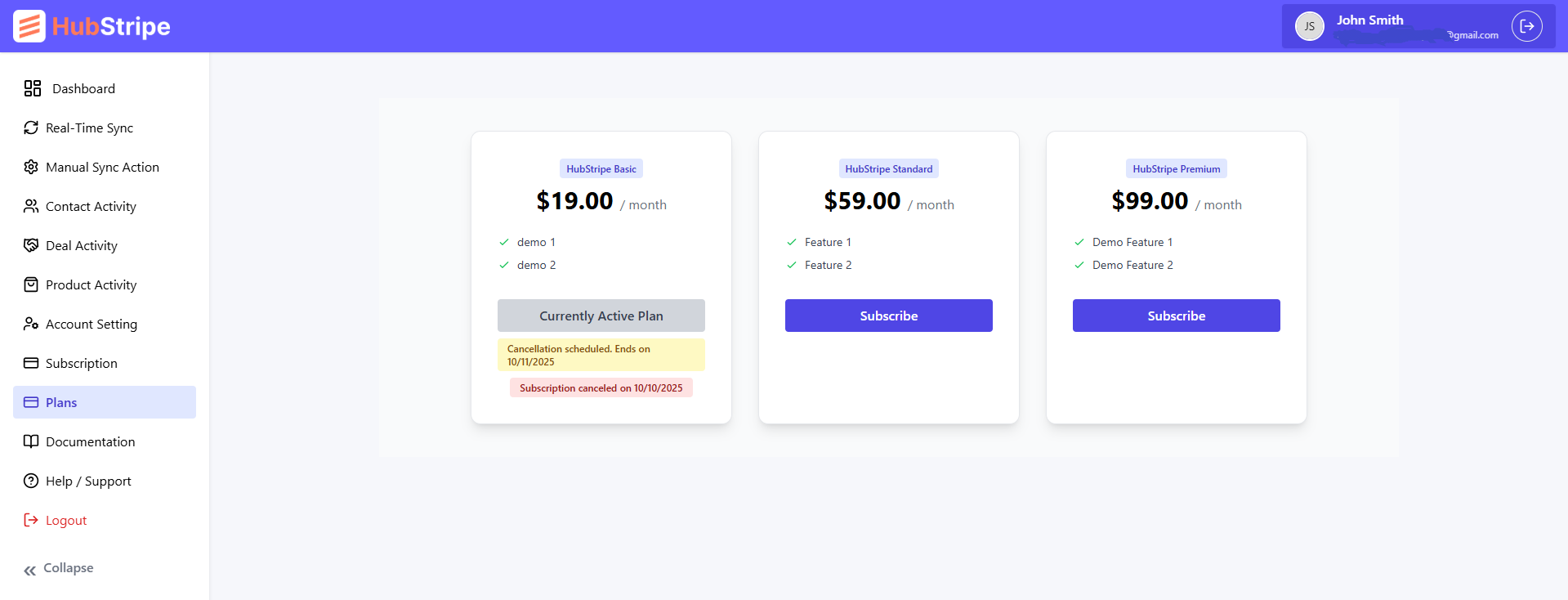
Plans overview with active and canceled states
Subscription
The Subscription page shows your currently active plan and allows you to manage or cancel your active subscription.
Status: Active
Your subscription will continue until canceled. You can cancel anytime from the same page.
If you click Cancel Subscription, a confirmation popup will appear. Upon confirmation, your subscription is canceled, and both the Cancellation Date and End Date will be displayed on the screen.
Cancellation scheduled. Your subscription will end on 10/11/2025
Subscription canceled on 10/10/2025
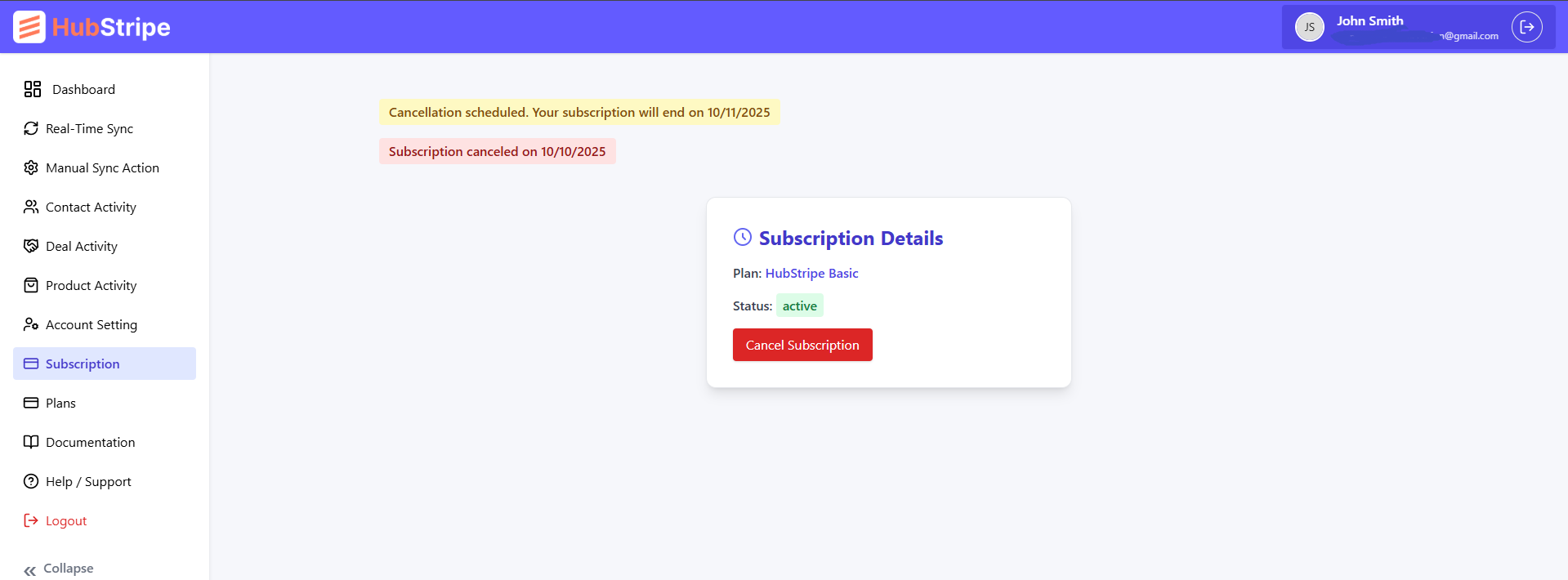
Subscription details page showing cancel state and dates
Disconnect & Re-authentication
HubStripe allows you to disconnect from Stripe and HubSpot at any time. To do so, click the Disconnect button on the HubSpot or Stripe connection screen.
Disconnecting will not remove or delete any existing records from HubSpot. It simply stops HubStripe from creating or updating any further records. You can reconnect at any time to resume syncing. Note: Disconnecting from Stripe will also stop real-time sync for all objects.
Disconnect HubSpot and Stripe account
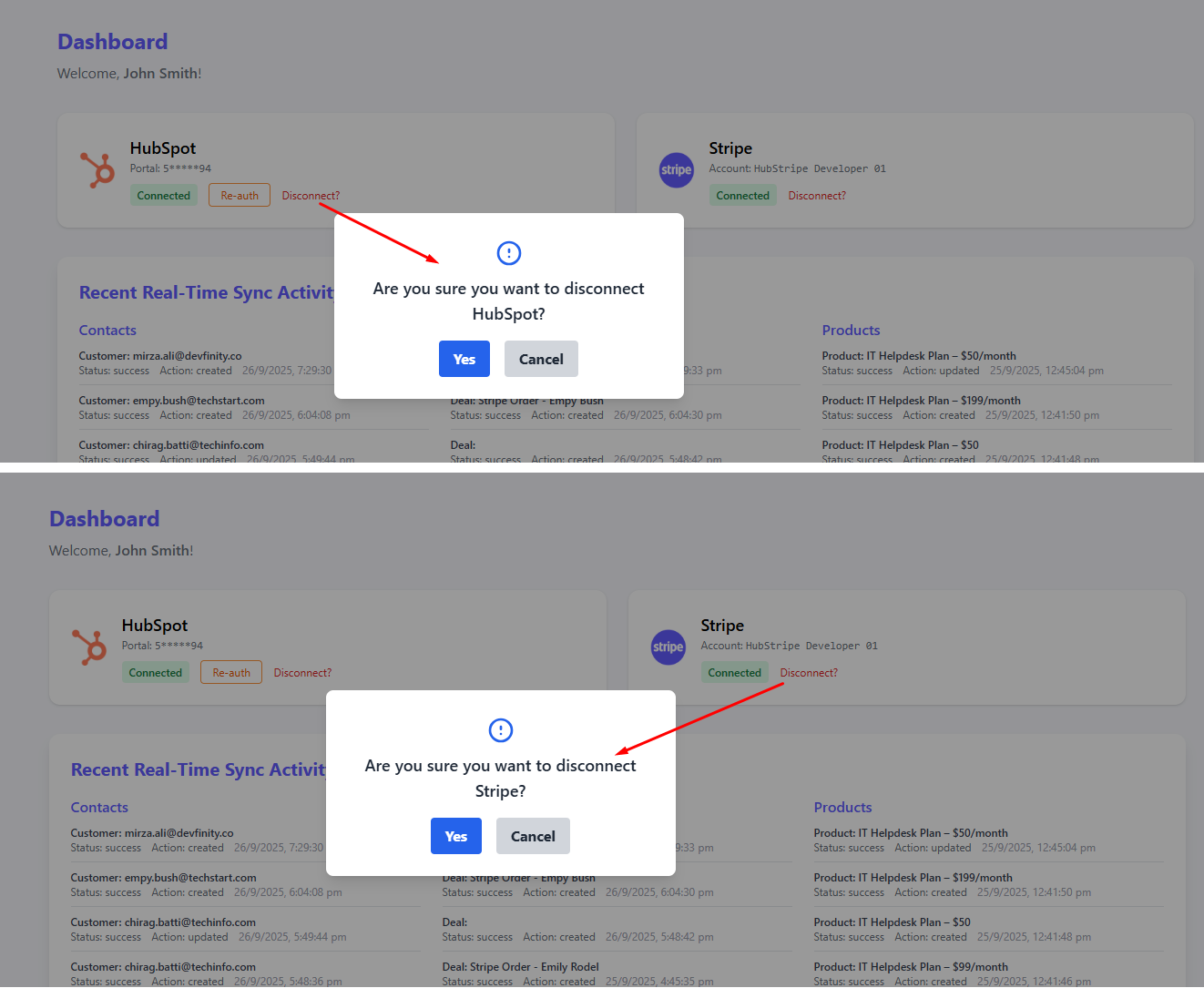
Re-authenticating HubSpot
If your HubSpot access token expires or permissions change, you will need to re-authenticate:
- Go to HubStripe → Dashboard.
- Click Re Auth.
- You will be redirected to HubSpot’s OAuth screen. Select the correct account and approve permissions.
- After successful authorization, sync resumes automatically.
Re-auth HubSpot account
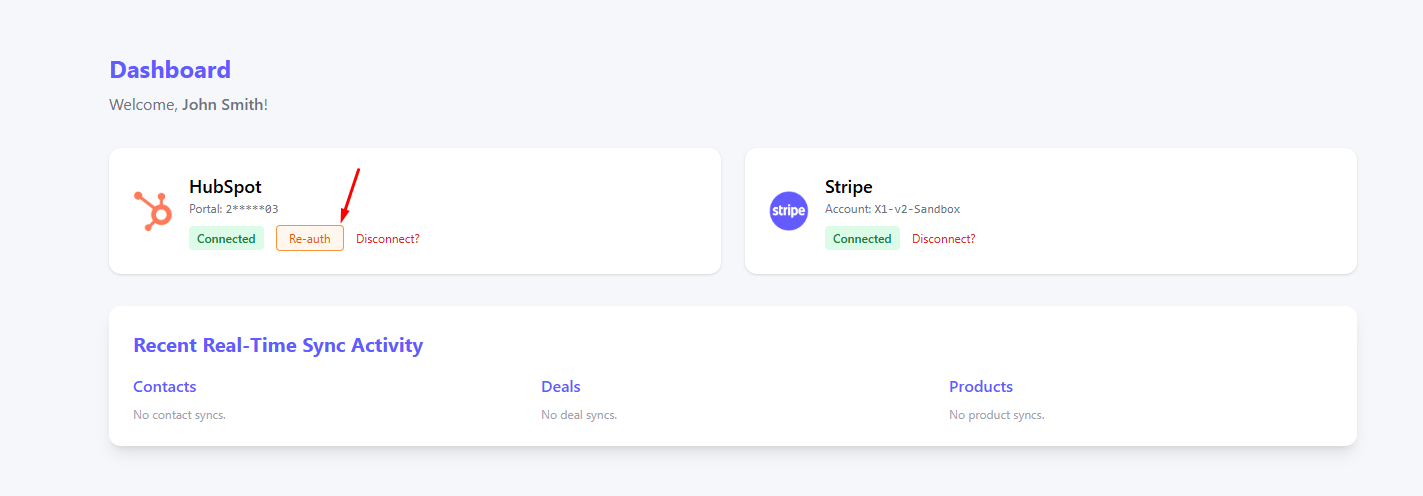
Note: Re-authentication does not remove your existing synced records in HubSpot. It only refreshes the connection for future sync activity.
Prevent Connecting to the Multiple Account for same portal
HubStipe do not allow same HubSpot or Stripe account for multiple users (allready connected accounts). If you try to connect the same HubSpot or Stripe account with another user, it will show an error message.
Error message when trying to connect the same HubSpot account with allready connected stripe account
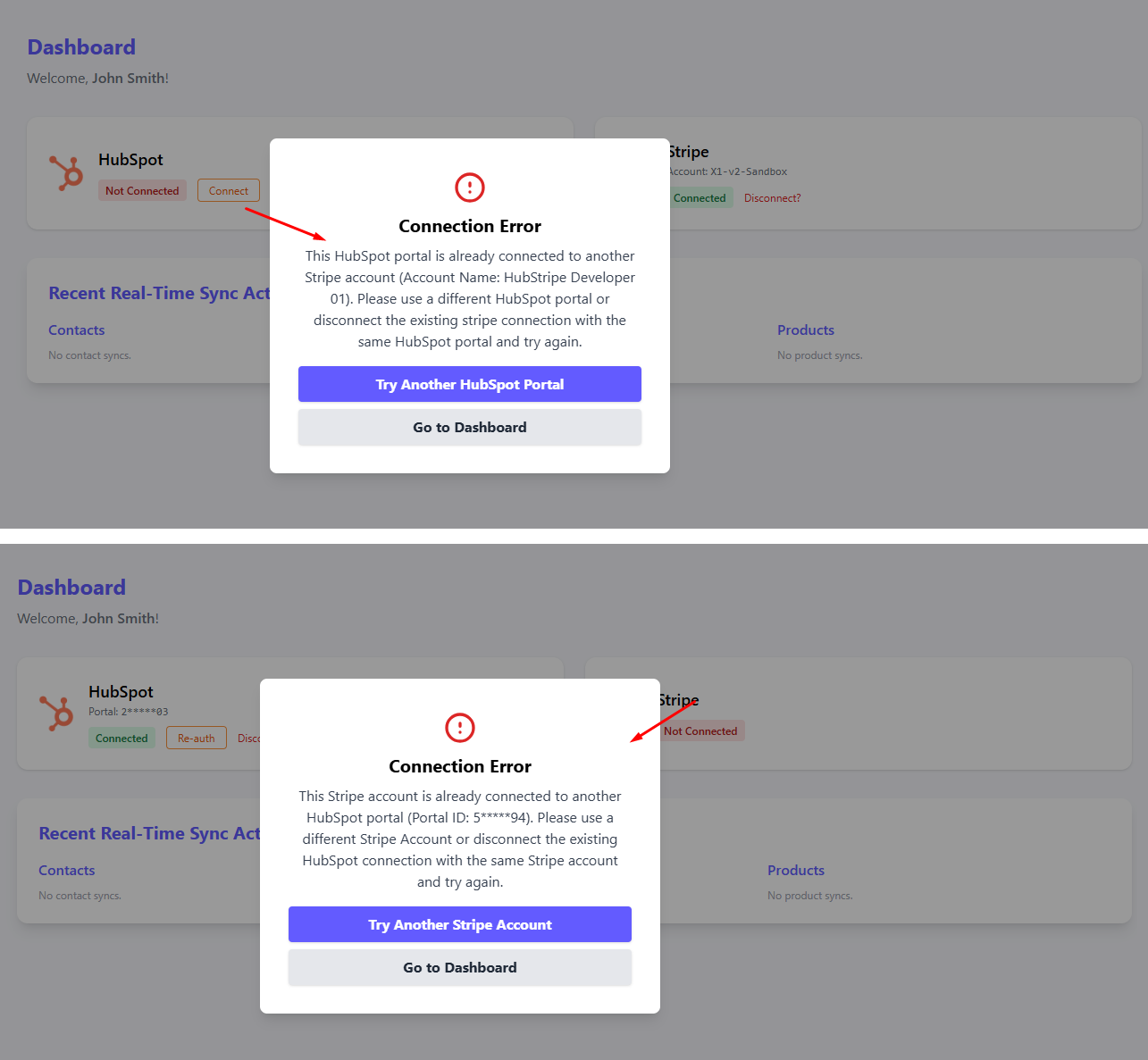
Error message when trying to connect the same Stripe account with allready connected HubSpot account
Forgot / Reset Password
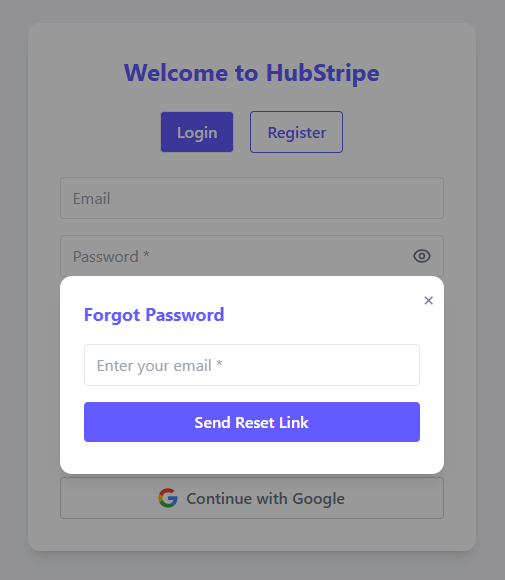
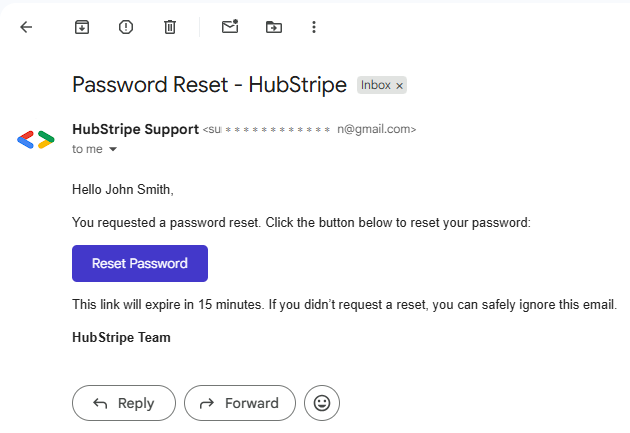
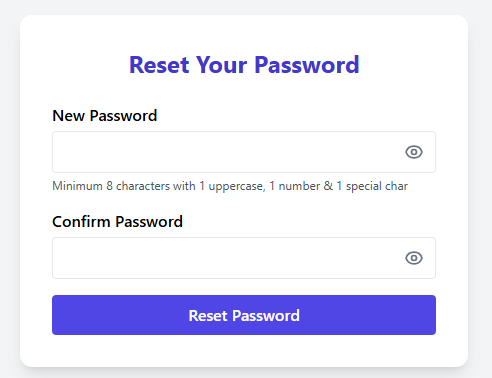
Lost access to your account? Click Forgot Password on the login screen. We’ll email you a secure reset link. Open the link, set a new password, and you’re back in. For security, reset links expire after a short period-generate a new one if needed.
Enter your email address and click send reset link
Open the email and click the reset password button
Enter password and click Reset password.
Compare with HubSpot’s Stripe Data Sync
Why teams choose HubStripe over HubSpot’s Stripe Data Sync for Stripe ⇄ HubSpot integration.
| Capability | HubStripe (This App) | HubSpot’s Stripe Data Sync |
|---|---|---|
| Manual / Historical Sync | Yes - import past records with a precise date-range selector for Contacts, Deals, Products. | Limited - historical syncing possible, but less control (date-range selection not emphasized). |
| Custom Properties Auto-Creation | Yes - necessary custom properties are provisioned automatically in HubSpot (e.g., Stripe Customer ID, Stripe Payment Status, etc.). |
No - requires manual setup if you want Stripe-specific fields. |
| Object Coverage | Contacts, Deals, Products (with line items). Future expansion planned for Payments & Subscriptions sync. | Primarily Contacts and Deals; product line-item syncing is limited. |
| Real-time Sync | Yes - configurable per object. Stripe webhooks → HubSpot in seconds. | Yes - but less flexibility in selecting which objects/events to sync. |
| Sync Visibility & Logs | In-app activity log shows recent events with Stripe and HubSpot record name, action, sync type and status (created/updated). | Limited visibility; troubleshooting often requires digging into HubSpot workflows or integrations. |
| Error Handling | Clear error messages; no silent failures. | Errors can be harder to trace if records fail to sync. |
| Ease of Setup | Guided onboarding, auto property creation, simple UI. | Requires more manual mapping & setup. |
| Reporting Impact | Enriched HubSpot reports with Stripe-specific custom fields (e.g., tax amount, payment status, product line items). | Basic sync only; advanced Stripe data not natively available in HubSpot reporting. |
Notes: This comparison is based on real usage and feedback. HubSpot’s Data Sync is designed for basic two-way record alignment, while HubStripe is built specifically for financial data accuracy, historical recovery, and reporting depth.
Why Choose HubStripe
- Manual Sync with Date-Range - Backfill historical Stripe data (Contacts, Deals, Products) with precision. No missed records.
- Custom Properties Auto-Creation - No manual field mapping required. HubStripe provisions Stripe-specific fields like
Stripe Customer ID,Stripe Payment Status,Stripe Invoice IDetc.. automatically. - Product & Line Item Sync - Unlike basic data syncs, HubStripe attaches Stripe products and prices as HubSpot line items, ensuring revenue reports match your actual catalog.
- Real-time + Historical Flexibility - Combine always-on webhook sync with one-time historical imports for full control.
- Error Transparency - Detailed activity logs show every record synced, including record name, action, sync type and create/update status, making troubleshooting straightforward.
- Simple & Secure Setup - OAuth-based HubSpot + Stripe connections, no custom API keys needed. Built for non-technical users.
In short, HubStripe is built for sales, finance, and operations teams that need Stripe data to be accurate, reportable, and always in sync with HubSpot - without manual data entry or missed transactions.
Contact Properties
Contacts are created from Stripe customers or matched by email if the customer already exists in HubSpot. The following fields are populated by HubStripe:
| Type | Property | Description |
|---|---|---|
| Custom | Stripe Customer ID | Maps to Stripe customer.id. Used for future updates and de-duplication. |
| Custom | Stripe Customer URL | Access Stripe customer stripe customer URL + customer.id. Used for direct access to stripe from HubSpot portal. |
| Default | First Name / Last Name | Customer name captured during checkout or from the Stripe customer profile. |
| Default | Primary email for communication and matching existing contacts. | |
| Default | Phone | Phone number when available from Stripe. |
| Default | City | City when available from Stripe. |
| Default | State | State when available from Stripe. |
| Default | Country/Region | Country when available from Stripe. |
| Default | Country/Region Code | Country code when available from Stripe. |
| Default | Postal Code | Postal code when available from Stripe. |
| Default | Address | Street address when available from Stripe. |
Deal Properties
Deals are created from Stripe orders and payments. When payments change status, the deal is updated accordingly. Products are attached as line items to the deal during creation.
| Type | Property | Description |
|---|---|---|
| Custom | Stripe Order ID | Identifier from the Checkout Session or Payment Intent used to create the deal. |
| Custom | Amount Subtotal | Subtotal before tax and discounts. |
| Custom | Tax Amount | Total tax collected on the order. |
| Custom | Stripe Payment Intent ID | Payment Intent reference for the transaction. |
| Custom | Stripe Payment Intent URL | Stripe Payment Intent URL for direct access, one click access. |
| Custom | Stripe Payment Status | Reflects the latest payment state (requires_action, succeeded, refunded, etc.). |
| Custom | Stripe Invoice ID | Invoice reference for invoiced payments. |
| Custom | Stripe Invoice URL | Stripe Invoice URL for direct access, one click access. |
| Custom | Stripe Subscription ID | Subscription reference for recurring deals. |
| Custom | Stripe Subscription URL | Stripe Subscription URL for direct access, one click access. |
| Custom | Stripe Customer ID | Back-reference to the contact created from the Stripe customer. |
| Custom | Stripe Customer URL | Stripe customer URL for direct access, one click access. |
| Default | Deal Name | Derived from the order (e.g., customer + order number). |
| Default | Amount | Total order amount including tax where applicable. |
| Default | Pipeline | Assigned to your selected pipeline (configurable in HubSpot). |
| Default | Deal Stage | Moved automatically based on payment status (e.g., Won when payment succeeds). |
| Association | Contact | Back-reference to the contact created from the Stripe customer. |
| Association | Line Item | Products attached as line items during deal creation. |
Product Properties
The product catalog is synchronized from Stripe. When deals are created, matching products are attached as line items so revenue, pricing, and subscription terms are visible to your sales team.
| Type | Property | Description |
|---|---|---|
| Custom | Stripe Product ID | Stripe product identifier used for matching. |
| Custom | Stripe Product URL | Stripe product URL for direct access, one click access. |
| Custom | Stripe Product Status | Whether the product is active in Stripe. |
| Custom | Stripe Price ID | Identifier of the price used by the deal line item. |
| Custom | Stripe Price Status | Whether the price is active. |
| Custom | Currency | ISO currency for the price (e.g., USD, EUR, INR). |
| Custom | Stripe Lookup Key | Lookup key maintained in Stripe for programmatic price selection. |
| Custom | Stripe Nickname | Display name stored on the Stripe price. |
| Custom | Stripe Price Type | One-time or Recurring. |
| Custom | Recurring Interval | day / week / month / year (for recurring prices). |
| Custom | Recurring Interval Count | Number of intervals between charges (e.g., every 3 months). |
| Default | Name | Product name displayed in HubSpot. |
| Default | Description | Product description from Stripe. |
| Default | Product Type | Goods or Services. |
| Default | Price | Unit price derived from the Stripe price object. |
Roadmap
HubStripe is actively maintained. Below are planned improvements and upcoming features. These may evolve based on user feedback and HubSpot platform changes.
- Subscriptions Sync — Bring recurring subscription objects (renewal dates, status, amount) into HubSpot.
- Payouts Sync — Map Stripe payouts and settlement reports into HubSpot for finance reconciliation.
- Enhanced Field Mapping — More fine-grained control over which Stripe fields map into HubSpot custom properties.
- Two-Way Sync (Optional) — Ability to update Stripe from HubSpot records, with safeguards.
Note: Features listed are in development or planned; availability may depend on HubSpot API capabilities and Stripe updates.
Need help or want a custom mapping?
Contact support and we’ll get you set up.